Finding duplicate, near-duplicate, and diverged documents across a SharePoint tenant
Five distinct ways the same document shows up across a tenant: exact, stale, diverged forks, near-duplicates, and same-name collisions. Hash plus version-history walk plus SimHash.
A site owner asked me which copy of a particular policy PDF was the real one. Six libraries had a file with the same name. Two had the same byte content. Two more were almost-identical but slightly older. The last two were materially different documents that happened to share a filename. The honest answer was “I don’t know yet, give me a few hours.”
Same filename. Six libraries. Five distinct problems.
Six SharePoint libraries hold a file called original.docx. Each leg below shows how a copy ended up in its category.
That question has a tool-shaped hole behind it. After a tenant migration consolidates hubs and shuffles libraries, the same PDF tends to multiply: somebody saved a copy into a personal site for safekeeping, the procurement team grabbed it for a vendor packet, an intranet page embeds it from a third location. Most of those copies are stale. Knowing which are stale, against which canonical version, is the part that’s hard.
I built a duplicate-detection scanner as a sibling to my link-inventory tool. Same plumbing: a tenant-wide Azure Function walking every site collection in scope. Different question.
Hash everything, group by hash
The first pass is the obvious one. Every document in the tenant gets hashed. Group by hash, surface anything that appears in more than one place. The output is a flat report: “this hash exists in 4 locations, here they are.”
That report is useful. It is not, by itself, the most useful report.
The interesting case is the stale copy
“Stale copy” means: an older version of file A is byte-identical to the current content of file B. A is the authoritative, recently-edited copy. B is the snapshot somebody saved into a different library three years ago and forgot about. Their current bytes are different (A has been edited since), so a flat current-bytes hash comparison misses them entirely.
The way to find them is to walk version history. Hash every prior version of every file. Then, for each current file, look for matches against the historical hashes of files elsewhere in the tenant. When file B’s current content matches what file A looked like three years ago, B is a stale snapshot of A.
The output reads like this:
Marketing/policies/vendor-conduct.pdf was last edited 2 months ago. PersonalSites/[user]/Documents/vendor-conduct.pdf is byte-identical to what Marketing had 4 years ago. The personal-site copy is stale.
Content owners can act on that. “Delete your copy and link to ours” is an easy ask when the report shows their copy is four years out of date. “Compare these two and reconcile” is a much harder ask when all you have is “here are six PDFs with the same name.”
That stale-copy report turned out to be the most useful single duplicate-detection feature for site owners. Most of what people call “duplicates” are not exact-current-byte matches. They are old branches of a document that diverged from the canonical copy and are now slightly stale. Surfacing those is what gets pages cleaned up.
Office docs needed a different hash function
PDFs round-trip cleanly through SharePoint upload. The bytes you put in are the bytes you get back, and identical files produce identical hashes whether they were uploaded last week or four years ago.
Office documents do not. Upload the same .docx to two libraries with different column schemas and SharePoint rewrites parts of the OPC zip on each upload to keep library column values in sync with the file’s properties, a behavior usually referred to as property promotion. The rewritten parts include enough metadata for the resulting full-bytes SHA-256 to differ between copies, even when no user-visible content has changed.
The empirical version: I uploaded a 1579-byte .docx fixture to two demo libraries on a test tenant. SharePoint accepted both copies and grew them to 8161 bytes each (around 6.5 KB of metadata added per upload), with different bytes per library. Their full-bytes SHA-256 digests disagreed.
The fix is a content-aware hash. For OOXML files (.docx, .xlsx, .pptx), open the OPC zip, drop the four rewritten part-families, then SHA-256 each remaining part with its name as a salt and combine. PDFs continue to use full-bytes SHA-256 because they have no equivalent rewrite problem. The hash index keys by (algo, hash) so the two modes never collide and existing PDF entries stay grouped while OOXML entries migrate as files get rescanned.
After the change, the same fixture uploaded to two libraries produces matching content-aware hashes. The full-bytes SHA-256 still disagrees (d0007c01… vs b2936fcd…), but the OOXML content-aware hash is identical (ba3e3e83… on both sides) and the exact-duplicate report groups the pair.
Renames-and-edits, and forks from a common ancestor
Exact and stale cover identical-bytes cases. Two cases they don’t cover:
-
The “FinalReallyFinal” rename chain. A document gets edited, polished, renamed, edited again. Every version drifts a few words from the previous one. None of them hash identically. The exact-duplicate report misses every link in the chain.
-
The diverged-fork case. The same source document was uploaded to two libraries, then both teams edited their copy independently. Neither current matches the other; neither current matches the other’s history (that would be the stale case). But somewhere back in version history they share a common ancestor, and “are these two documents the same thing now?” is exactly the question the content owner needs answered.
Both cases need a fingerprint that survives small content changes. The hash index now stores two extra values per file (and per historical version): a SHA-256 of the document’s normalized visible text, and a 64-bit SimHash over 3-shingled word tokens.
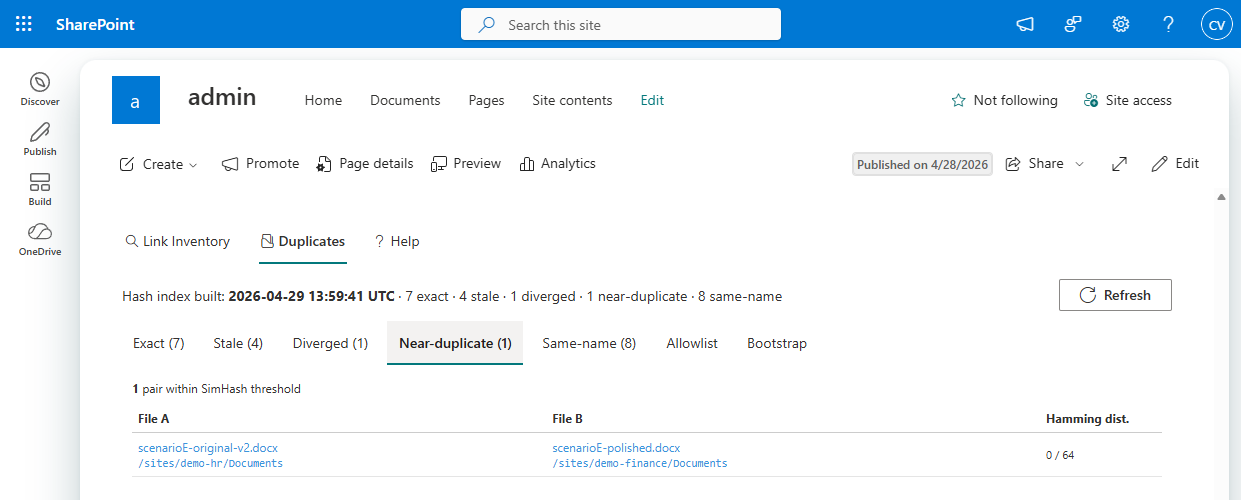
For the rename chain, the Near-duplicate query is pairwise SimHash with a Hamming-distance threshold of 3. When two documents have visible text that’s similar enough, their SimHashes are within a few bits of each other regardless of formatting changes, reviewer comments, or the property-bag rewrites SharePoint did along the way. Distance 0 means identical text. The report sorts pairs closest-first.
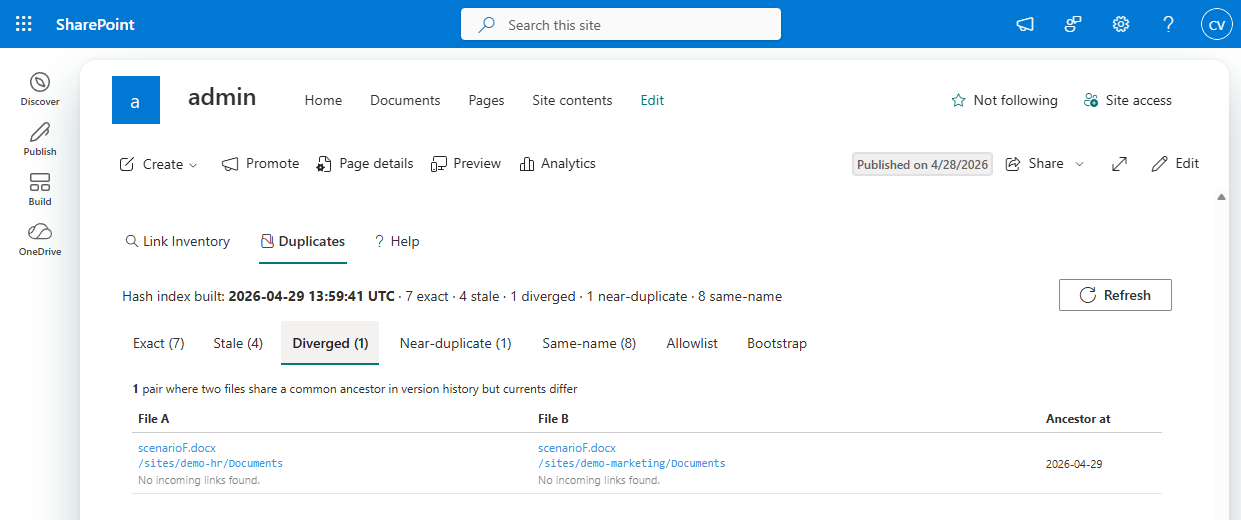
For the divergence case, the Diverged query builds an inverted index: text-content hash from any historical version, mapped to the files that produced it. Any text-hash bucket with two or more contributing files is a candidate. The query then drops pairs that are already exact matches (currents agree, Exact tab) or asymmetric (one current matches the other’s history, Stale tab), leaving the symmetric “we both came from the same place and have both moved on” case.
The Diverged join is on text-hash, not content-hash, deliberately. Two SharePoint uploads of the same source can pick up different [trash]/* parts that the OOXML content-aware hash doesn’t fully cancel out. The text-content hash is robust to those differences. So is it robust to the bytes that SimHash would care about, which makes it the right key for finding shared origins.
What the report actually looks like
Same Azure Storage account as the link inventory. Same SPFx web part. The duplicate-detection view has five result tabs, each answering a different “are these the same document?” question:
- Exact: current-bytes hash groups. Identical content right now.
- Stale: version-history match. One file’s current is what another file’s previous version was.
- Diverged: common ancestor, both edited away. Currents differ, neither is in the other’s history, but their histories overlap in the text-hash sense.
- Near-duplicate: SimHash within threshold. Same words, possibly some polish edits.
- Same-name: filename collisions across libraries, useful for triage when the hashes don’t group anything but the names look suspicious.
Each row links straight to the underlying file. Pair rows pair both files with whatever metadata the tab needs: last-modified dates and the divergence date for Stale, the Hamming distance for Near-duplicate, the shared-ancestor timestamp for Diverged.
Site owners get scoped to their own sites. Tenant admins see everything. The web part exists for the same reason the link-inventory web part does: PowerShell does not handle five thousand site collections gracefully, and the people who actually care about tenant content sprawl are not going to run PowerShell anyway.
The other half of the answer
What the dupe scanner gives you is a list. What it does not give you is judgment about which copy should win. That call is governance, not tooling, and the right person to make it is the content owner who’s been staring at six versions of the same vendor policy PDF for three years wondering which one to trust.
The tool answers a smaller question: “given that you’re going to make that call, here is what’s actually in your tenant.” Most cleanup work bottlenecks on getting the inventory right. Five distinct ways to find “is this the same document?” turns “we have duplicates somewhere” into “delete these specific 47 files.”