Clarity for SharePoint, with context
The default Microsoft Clarity for SharePoint app gives anonymous heatmaps; a custom integration adds identity-aware tagging so intranet teams can see who actually uses which pages.
I shipped my own Microsoft Clarity integration for SharePoint. There’s already a first-party app in the SharePoint Store. Here’s why I built another.
What the default integration gives you
Install Microsoft Clarity for SharePoint from the SharePoint Store, paste a Project ID from the Clarity dashboard, and within an hour you have:
- Heatmaps of every modern SharePoint page
- Session recordings of actual user clicks, scrolls, dead clicks
- Auto-detected dimensions: country, device, browser, OS, screen size
- Clarity’s default “rage click” and “JavaScript error” insights
For most intranet shops that’s already a step up. You see which pages get traffic, which navs people miss, where they thrash. It’s free, it’s first-party, it took ten minutes to install.
What it doesn’t tell you
The first-party app exposes a single configuration field: the Clarity Project ID. There’s no toggle for identity, no toggle for user attributes, no scope filter, no opt-in for anything else. The Microsoft doc walks through it end to end and Project ID is the only knob. So sessions show up in the dashboard with anonymous Clarity-generated IDs, page-keyed but otherwise blank.
You can see that twelve people clicked the same button on a page yesterday. You can’t see whether all twelve are in the same department, whether they’re frontline staff or back-office, whether they sit in branch 3 or branch 14. You can’t filter to “show me how new hires under 90 days use the intranet” or “show me only sessions from the call center.” Clarity is collecting plenty. SharePoint just hasn’t told it who’s looking.
Reasonable defaults for first-time setup. Insufficient defaults for actual analytics.
The custom build
I wrote an SPFx 1.22 solution that owns the Clarity tag end-to-end. Same clarity.ms script, same recordings, but with the Clarity identify API and setTag API wired up to SharePoint’s pageContext and Microsoft Graph.
The admin web part is a single Fluent UI form. Toggles for what to send: identity (email hashed by Clarity before storage, display name in plaintext), Entra attributes (department, job title, office location, tenure bucket, any Graph property the admin picks), page context (site template, layout bucket, host: Browser, Teams, or Viva Connections), browser diagnostics, custom interaction signals like Microsoft Search query capture. Configuration lives in a tenant property in the App Catalog; changes apply on the next page load. Scope rules let admins dial down to specific sites while tuning.
Each session is now tagged with the user’s role and team. The dashboard’s Filters panel slices Recordings by department, by tenure, by branch. Anonymous Clarity IDs stay anonymous on the wire (the custom-id is hashed client-side before transmission). But internally, when filtering, the question shifts from “how do users use this page” to “how do frontline staff use this page.”
The privacy frame
Worth saying out loud.
Yes, the custom integration sends more about each user than the default does. Email (hashed), display name, department, office. That’s worth being honest about.
It’s worth being honest about the rest of the picture too. Your HR system already knows the org chart. Your identity provider already logs every sign-in with name, IP, device. Your endpoint management already inventories browser and OS. Your SharePoint audit log already knows which files each named user opened, when, and from where. Microsoft Search query logs sit in the security and compliance center with full text. Every one of those is a separate vendor surface, a separate query language, a separate “go ask the IT analyst.” The data exists. The UX doesn’t.
Clarity-with-context isn’t new collection. It’s a re-projection of existing collection into one place where a comms team or product owner can answer their own questions without filing tickets.
The hard-wired refusals are still there. The customizer never sends DOM content from the page. No document titles, no list item names, no web part body text. It never sends error messages or stack traces, only the error class (TypeError, NetworkError). It never sends URL query strings, with one narrow exception: the Microsoft Search q parameter, only when the admin explicitly opts in. Suggested Entra fields like birthday, employeeId, streetAddress, and consentProvidedForMinor carry inline warnings in the admin UI. The admin can still tag them. The warning makes them stop and think first.
The question that becomes answerable
Here’s the shape of the case that justified the build for me.
A heatmap shows users clicking the same PDF on the same page over and over, then bouncing off. Default Clarity stops there: lots of clicks, lots of bounces. The action item is “redesign the page” or “fix the link,” and the next quarter you find out whether that worked.
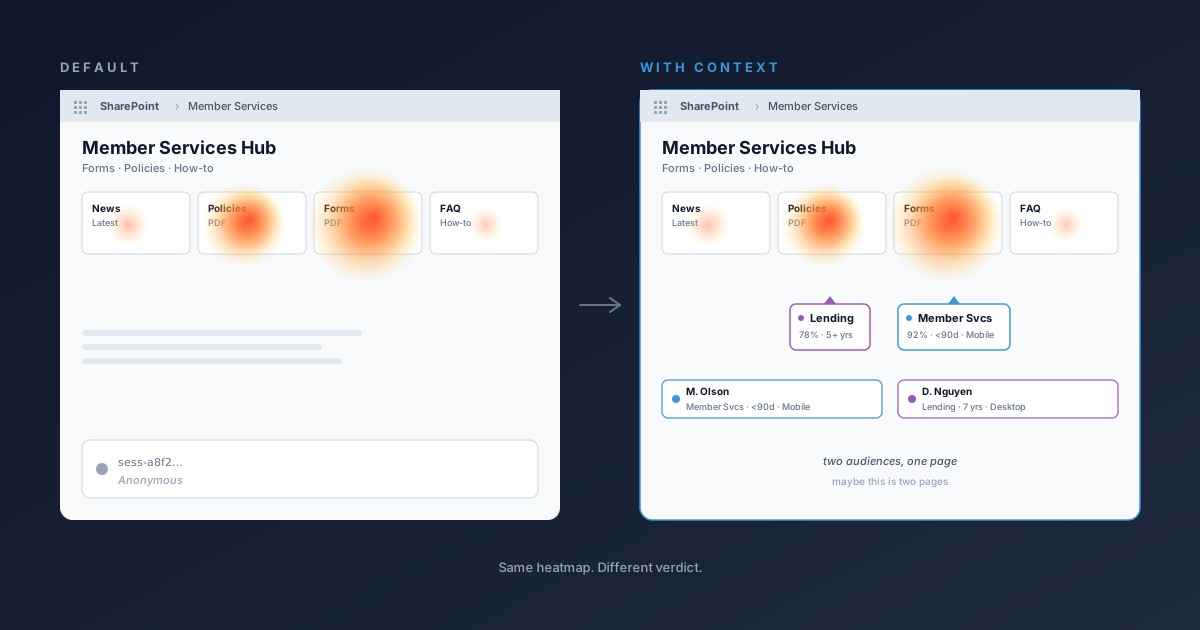
Identity tags split the same heatmap by who’s actually clicking. If the bouncing is concentrated in department=Member Services on mobile, the action item changes. The PDF isn’t a navigation problem on this page. It’s a job-aid problem for a specific role, and the right fix is a shortcut page that surfaces what that role actually needs without the surrounding context.
Default Clarity gets you “people use this page.” Custom Clarity gets you “this group uses this page for this reason, and the better fix is somewhere else entirely.”
When one page is really two
A different shape, same idea: the heatmap shows two clusters on the same page, both hot, and the default integration calls that “engagement.” Identity tags call it something else.
If one cluster is concentrated in Lending sessions and the other is concentrated in Member Services sessions, that’s not one page two roles agree on. That’s two pages glued together, and the audiences are politely working around the parts that aren’t theirs. The fix isn’t a redesign of the existing page. It’s a split: a Lending-flavored page surfacing what Lending actually clicks, and a Member Services one doing the same. The hub keeps both as tiles. The heat moves to the right places.
You don’t get to that conclusion from the anonymous heatmap. You get a “popular page” award and a redesign ticket.
The retire-this-page question
The flip side is just as useful: does this page actually earn its keep?
Big intranets are full of pages nobody loves. Old policy hubs, abandoned project sites, training material for a system that got replaced two years ago. Default Clarity tells you the page got 200 views last quarter. It can’t tell you whether those views were end users finding it useful or the page’s owner checking their own work.
With identity tags, you can split that out. If a page’s traffic is dominated by the team that owns it and the rest are bounce-on-arrival, the page isn’t being used. It’s being maintained. Delete it, redirect it, or fold its content into a page that the right department actually visits. Same data, different verdict: keep, fix, or kill.
What this won’t do
The Clarity script still loads from clarity.ms. Browser extensions or corporate proxies that block *.clarity.ms block this too. No SPFx solution can fix a destination-domain block.
It won’t run on the native SharePoint mobile app. SPFx Application Customizers don’t load there.
It won’t override what Clarity itself collects autonomously: IP, user agent, screen size, geo from IP, DOM content with default masking. Those are product properties of Clarity, configured at clarity.microsoft.com.
Heft-based SPFx 1.22 only. Node 22 LTS. Tenant App Catalog access. A Microsoft Clarity project.
Closing
The default Clarity for SharePoint is a fine drop-in. If “anonymous sessions, page-level only” is what you need, it’s already in the store. Install it.
If you want to know who’s actually using your intranet, the customizer is the next step up, and you get decisions out of it.
Decisions, not just dashboards.