SharePoint orphan cleanup that survives renames
A Reddit thread asked how to clean up SharePoint Site Assets after deleting pages. The tenant scanner I had already built had most of the answer.
Someone on r/sharepoint asked how to clean up the per-page asset folders left behind under SiteAssets/SitePages/ after pages get deleted. The OP was looking at wiring up a Power Automate flow that fires on page deletion and removes the matching folder. The classic alternative is a PowerShell loop: list pages, list folders under SiteAssets/SitePages/, diff the folder names against page filenames, recycle anything that doesn’t match. The diff approach kills live assets on any tenant that’s been around for more than a year.
The cleanup tool I ended up writing is a sibling to my link inventory and duplicate detection tools. Same Azure Function backend, same SPFx web part, third tab. Different question of the same data.
Why naive name-diff is a mine field
When SharePoint creates the per-page asset folder, it names it after the page at creation time. After that, the name is sticky. Two cases break the naive comparison.
Renamed pages. Rename a page from Q1Plan.aspx to Q1Roadmap.aspx, and SharePoint changes the page filename. The asset folder stays at SiteAssets/SitePages/Q1Plan/. The page’s CanvasContent1 continues to reference assets through the original folder URL, because rewriting every embedded asset URL on every rename would silently break any pages that cross-reference. Naive name-diff sees a folder named Q1Plan with no Q1Plan.aspx to match it, flags it as orphan, and recycles a folder full of live banner images.
Custom page templates. Pages created from a custom page template name their asset folder with a GUID, not the page title. There’s no folder name to compare against, full stop. Any tenant with a branded page template (any tenant with a comms team has one) gets every custom-template asset flagged on the first naive run.
Both behaviors are by design. A Microsoft moderator confirmed it on a Q&A thread about the GUID-folder case: “The folder name is set at creation and can’t be changed later without breaking links.” That rule covers both failure modes. The folder name is whatever it was at creation, the page’s CanvasContent1 references it by that name, and SharePoint is not going to rewrite the references for you on rename or anywhere else.
There are workarounds people propose. None of them work. Don’t rename pages: good luck with that. Avoid custom templates: same. Diff against page IDs not titles: SharePoint doesn’t put page IDs in folder names. The right move is to stop diffing folder names entirely.
The reframe
The tenant link inventory walks every modern page on every site collection in scope and pulls every URL out of CanvasContent1 and LayoutWebpartsContent. Each URL gets canonicalized and indexed by file. The persistent index, keyed by canonical URL, is what powers the “where is this referenced?” backlinks panel on the link inventory tab.
Reading the Reddit thread, the realization was: the question “is this asset orphaned?” is a query against that exact index. I don’t need to compare folder names. I walk SiteAssets/SitePages/ once per site, compute each file’s canonical key, and ask the index. If something points at it, retained. If nothing does, orphan.
The rename gotcha disappears: the index has the actual URL the page references, not what the URL “should be” under some rename-aware logic. The custom-template gotcha disappears: a page that references 2f8c1d4a-7b3e/banner.png puts that exact key in the index. Whatever folder the asset lives in, by whatever name, it shows up referenced if a page references it.
I’m not diffing folder names against page names. I’m asking a different question that has a real answer.
What it took to add as a third tab
The link inventory’s persistent backlinks index is stored as a single blob, refreshed on every scheduled scan. To answer the orphan question per site, I needed:
- A folder walker for
SiteAssets/SitePages/. The existing document scanner explicitly skips that folder because pages live there. Small new service. - A pure diff function over
(BacklinksIndex, SitePagesAssetFile[])that returns the orphans. Trivial; the index already has the canonical key for every referenced URL. - Two new HTTP endpoints. One generates the report (admin-gated, with a freshness gate I’ll get to). The other takes a selected list and recycles each file via SP REST.
- A new
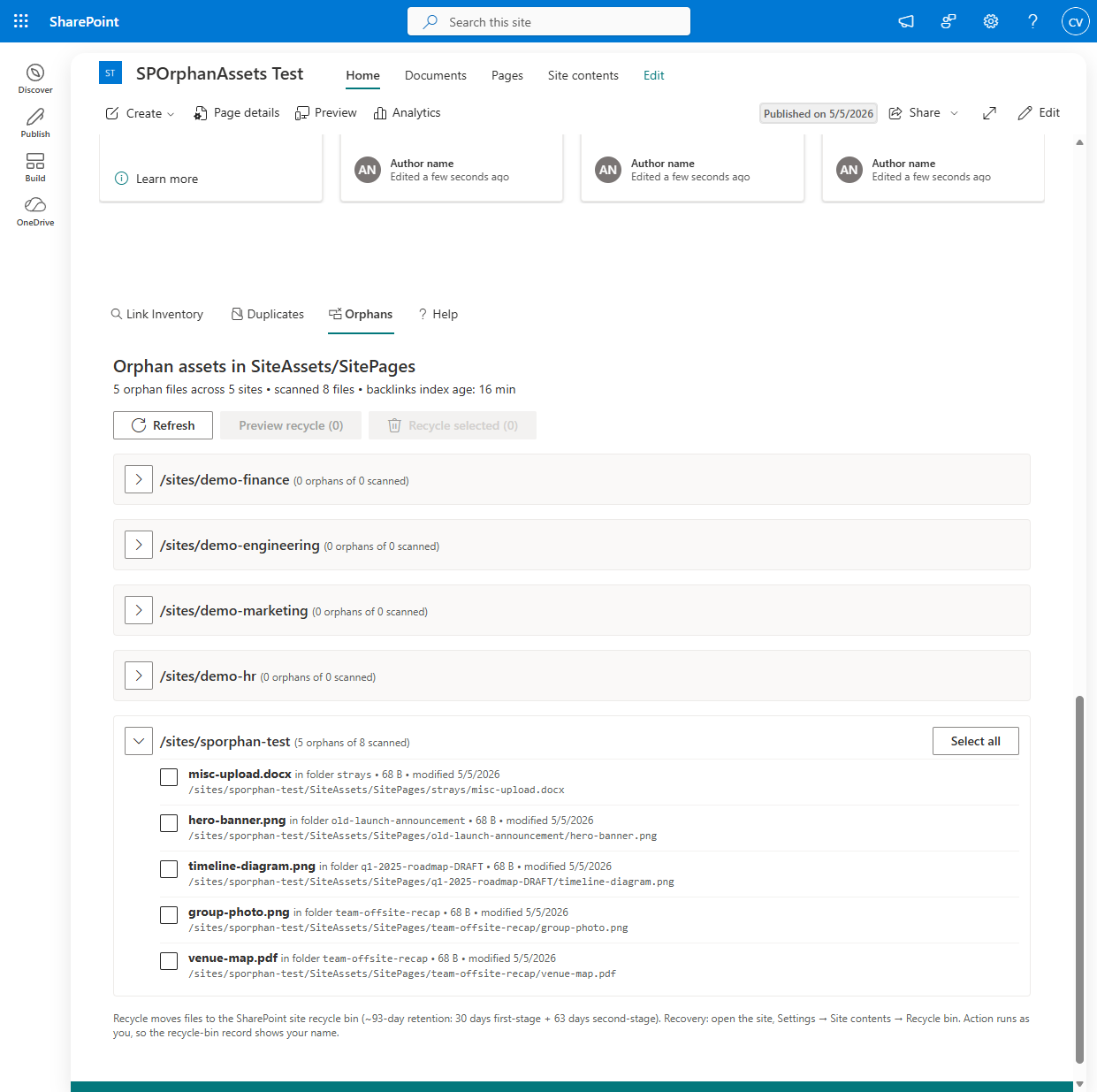
Orphanstab on the SPFx web part, matching the Duplicates tab’s conventions: per-site grouped list, checkbox selection, dry-run preview, separate button for real recycle.
The one real wrinkle: BannerImageUrl
The existing scanner parsed CanvasContent1 and LayoutWebpartsContent. It never looked at the page-level BannerImageUrl field. I assumed at first that the banner URL would be embedded in the title-region web part’s serverProcessedContent.imageSources. It is not. I confirmed this empirically against a dev-tenant page with a custom banner: imageSources is {}, the title-region properties carry imageSourceType: 4 (URL), and the actual URL lives only on BannerImageUrl.
Without scanning the banner field, a banner-only asset would false-flag as orphan even with the reference-scan approach. The fix was small: add BannerImageUrl to the field selector, synthesize a banner-source ExtractedLink per page, and let it flow through the existing classification and index pipeline. That extension benefits the link inventory feature too. Broken and cross-site banner references now show up in the inventory report as well.
Recycle, not delete. As the user, not as the app.
Two decisions on the action side worth calling out.
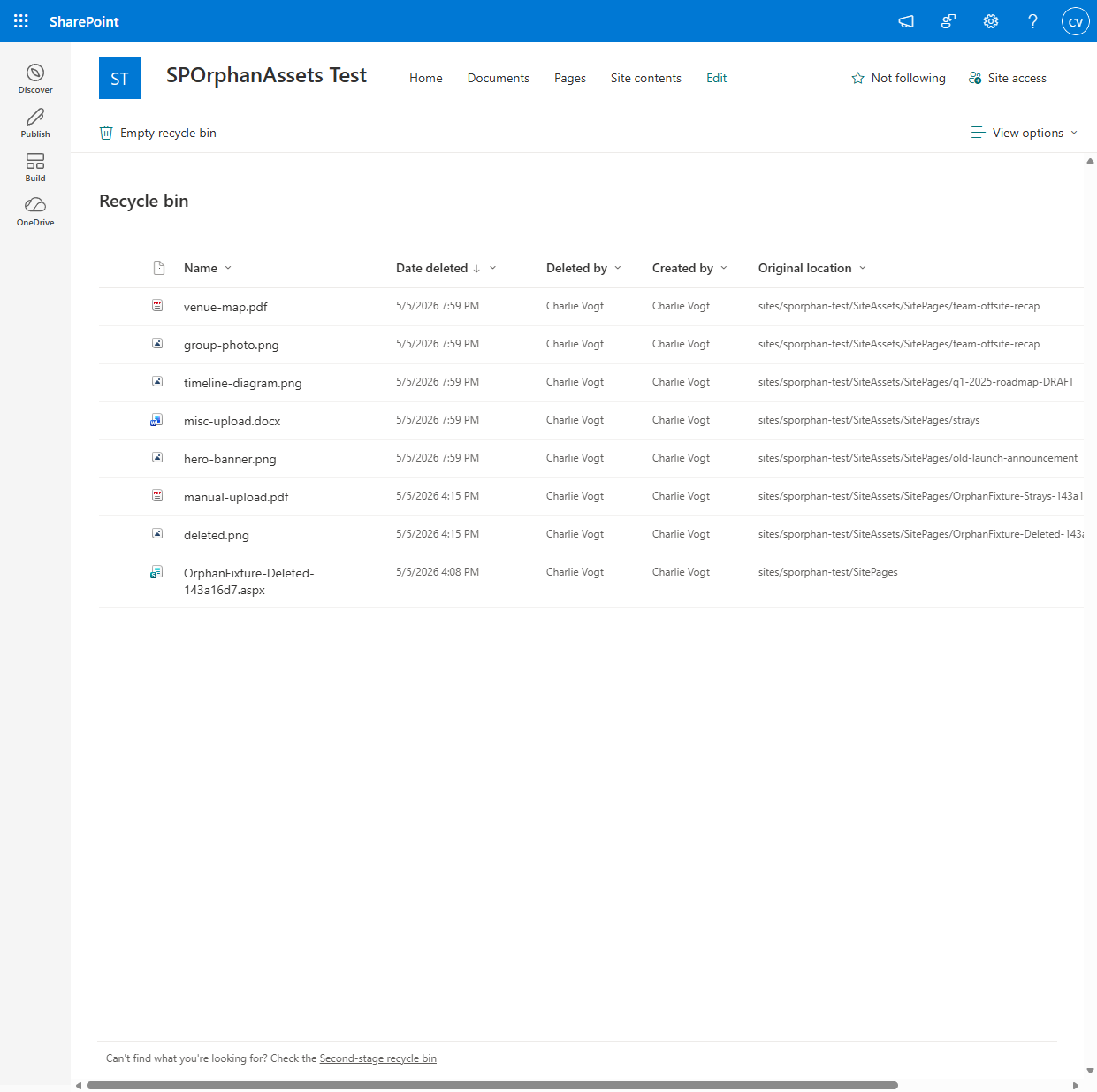
The recycle action moves files to the SharePoint recycle bin, not a hard delete. The retention window is 93 days total (30 days first-stage + 63 days second-stage). A misclassification is recoverable through Site contents → Recycle bin for the rest of that window. The function exposes no hard-delete option, by design.
The recycle call runs as the calling user via OBO, not as the function’s app identity. SharePoint’s recycle bin records who deleted each file, and I want that to be the actual operator. Audit trails are useful when something goes wrong, and SP enforces the user’s actual file-level delete permission as a final safety check. The function-level admin gate is a coarse “you’re allowed to use this UI” check; the per-file SP-side check is the authoritative one. Both fire.
Stale-index gate
One freshness gate worth knowing about. If the last scheduled scan was two days ago and a page was created yesterday with a banner asset, the orphan report would flag that asset as orphan because the index hasn’t seen the new page yet. The endpoint refuses to run if the index is older than six hours by default, configurable, with a per-request override flag for “I know what I’m doing.” The defaults are tuned for a tenant running the daily scheduled scan; tighten if your edits move faster.
The tenant scanner. Orphans tab is a sibling to the link-inventory and duplicates tabs.
For single-site users
If you run one SharePoint site and standing up an Azure Function plus an SPFx web part is overkill for what’s literally a one-time cleanup, the same algorithm runs as a small PowerShell module. Get-SPOrphanAsset enumerates page references, walks SiteAssets/SitePages/, and returns the diff. Remove-SPOrphanAsset recycles. PnP.PowerShell, no Azure infrastructure, same reliability properties on a smaller blast radius.
Standalone PowerShell module. Same reference-scanning algorithm, single-site scope, no Azure required.
Close
Once the data exists, every cleanup question becomes a query.