Trailing-month tabs in PnP Modern Search that don't need a monthly redeploy
A single Handlebars template generates a self-advancing twelve-month tab strip. No rebuilds, no SPFx helpers, no JavaScript.
A SharePoint Online site I worked on had a “New Employee Bios” page with a tab strip that looked like this:
Jun 2025 | Jul 2025 | Aug 2025 | … | Apr 2026 | May 2026
The tabs web part was the kind where each tab is just static content. Every month, someone in HR had to remember to edit the page. Type in the new bios. Add a new tab. Retire the oldest. Republish.
Modernizing meant moving the bios out of the page and into a SharePoint list with a hire date, then surfacing them through PnP Modern Search. That solves the data side. Bios become rows instead of paragraphs of page text. But the tab strip is still wide open. The naive rebuild is twelve Search Results web parts, one per month, each KQL-filtered to that month’s new hires. Twelve copies of the same web part, twelve tabs, twelve manual edits a year. The monthly ritual just moves from typing bios to editing KQL.
I wanted one web part. One template. Tabs that re-render themselves.
That strip is computed live from the date you load this page on. Refresh it next month and you’ll get a different range. The real Handlebars template that ships in production does the same thing, just at SharePoint render time instead of in React.
Here’s the trick.
The web part has a built-in template language, and templates can compute things at render time, including dates relative to today. So instead of hard-coding tab labels for twelve months, the template asks the browser what today’s date is and works back from there. Open it in May, get May back to last June. Open it in June, get June back to last July. The page rewrites itself every visit.
The recipe
PnP Modern Search’s Search Results web part runs templates through Handlebars, a small template language with helpers for common operations. The two this template uses are JSONparse (turns a string of JSON into an array the template can loop over) and moment (does date math). That’s all you need.
{{#with (JSONparse "[\"0 month\",\"1 month\",\"2 month\",\"3 month\",\"4 month\",\"5 month\",\"6 month\",\"7 month\",\"8 month\",\"9 month\",\"10 month\",\"11 month\"]") as |durations|}} {{#each durations as |dur|}} <input type="radio" name="bio-tab" id="bio-tab-{{getDate (moment (moment) subtract=dur) 'YYYY-MM'}}"> {{/each}}{{/with}}JSONparse turns a literal string into a Handlebars-iterable array. Iterating it gives the template twelve passes, one per duration. Inside each pass, the date math chain:
{{getDate (moment (moment) subtract=dur) 'YYYY-MM'}}The inner (moment) returns today as a date string. The middle (moment STRING subtract=dur) subtracts the duration. The outer getDate formats the result as YYYY-MM. Twelve iterations, twelve unique radio IDs, one per trailing month, and the values are all relative to the moment the page renders. Browsers go to bed today and wake up with a new tab strip tomorrow on the 1st of next month.
The same loop runs again for the labels. And once more inside the <style> block to generate the per-month CSS visibility rules:
#bio-tab-{{getDate (moment (moment) subtract=dur) 'YYYY-MM'}}:checked ~ .bio-grid > .bio-card[data-month-key="{{getDate (moment (moment) subtract=dur) 'YYYY-MM'}}"] { display: block; }Each card carries data-month-key="2026-04" (or whichever month its EffectiveDate falls in), and the matching :checked ~ sibling rule shows it. Tab switching is pure CSS via hidden radios. No JavaScript, no event listeners. The browser does the work.
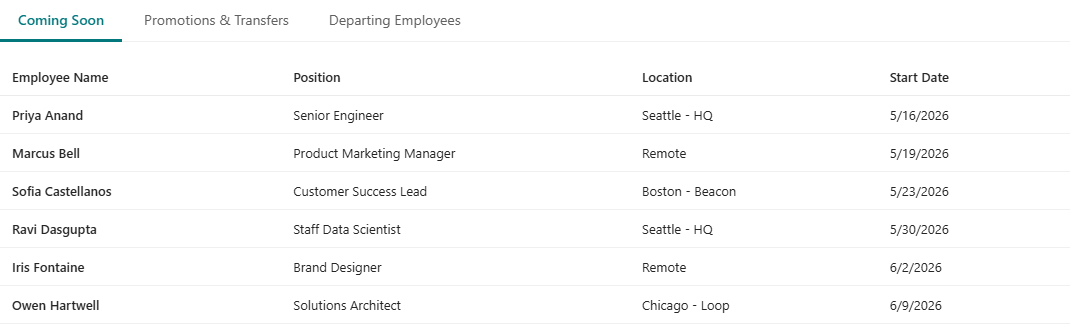
Above the bios I added a second Results web part with the same template idea but three fixed tabs: Coming Soon (future-dated entries), Promotions & Transfers and Departing Employees (both within a ±45-day window of today). Same recipe, different durations. The date windows are evaluated against today at render time, so they slide forward without any redeploys either.
While the bios web part is wired to a connected Search Box, the top one isn’t. Typing a name into the search box hides the month tab strip and surfaces every matching card across all twelve months at once via a [data-search*="query" i] attribute selector. Pure CSS again.

A grouped variant
The flat 12-month strip works, but it gets long. Twelve labels in a row crowds the page and the year ambiguity (was that Jun last year or this year?) only resolves if every label carries MMM YYYY text. A nicer alternative: split the strip into two year columns, each labelled with its year, each holding the months that belong to it. Six months under 2025, six under 2026. When the calendar rolls over, the split slides one month to the right.
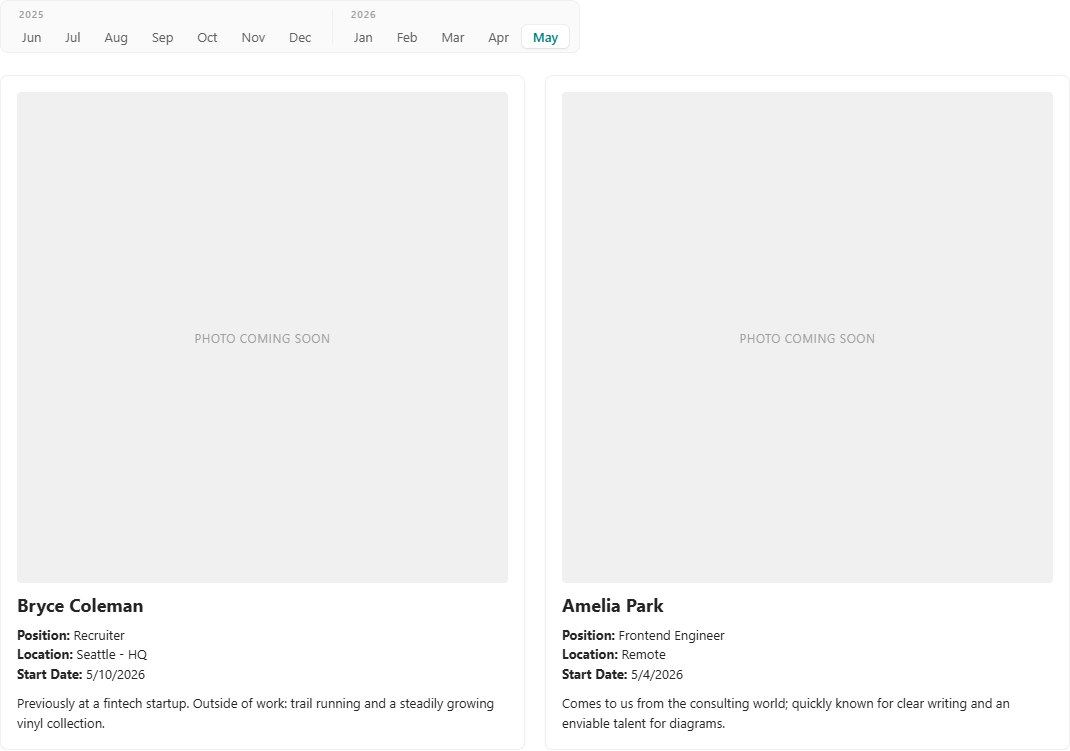
Same template machinery. Each year column iterates the same twelve-duration list but only renders months whose YYYY matches that column. The previous-year column auto-hides via :empty on the one month a year when the trailing window happens to land entirely in the current year:
<div class="bio-tab-year"> <div class="bio-tab-year-label">{{getDate (moment (moment) subtract='1 year') 'YYYY'}}</div> <div class="bio-tab-months"> {{#each durations as |dur|}} {{#if (eq (getDate (moment (moment) subtract=dur) 'YYYY') (getDate (moment (moment) subtract='1 year') 'YYYY'))}} <label class="bio-tab-label" for="bio-tab-{{getDate (moment (moment) subtract=dur) 'YYYY-MM'}}"> {{getDate (moment (moment) subtract=dur) 'MMM'}} </label> {{/if}} {{/each}} </div></div>The same loop renders again with the current year’s YYYY for the second column. No hardcoded years, no monthly edits.
I also wanted a soft cross-fade when you switch tabs instead of cards snapping in and out. That part was harder than it should have been, and lands me in the next bug.
Three things that bit me
The next three sections are debug stories. Skip them if you’re not building this yourself.
1. <table> foster-parenting eats your rows
The first version of the top tab used a <table> with an {{#each}} loop inside <tbody>. The loop iterated over thirty-four items, my {{#if}} gated each row by EntryType and date window, and the DOM came out with the head row, one empty placeholder row, and… that was it. No data rows, no errors, no logs.
The browser’s HTML parser has a special “in table” insertion mode that foster-parents non-table content out of the <table> and into the document immediately before it. Pure whitespace is allowed by the spec, so an {{#each}} body that’s just indented text and <tr> elements should be safe, and yet mine wasn’t. The most likely real culprit is DOMPurify, which PnP runs over every rendered template before injecting it into the page; a re-parse pass turns one ambiguous string into a different DOM than the one Handlebars handed it, and <tr> elements outside their original <tbody> context end up getting foster-parented or dropped.
I didn’t fully unwind the cause. The fix is to skip <table> entirely. Use a CSS grid <div> instead, with each row as its own grid container and shared grid-template-columns so the columns line up. Plain divs don’t put the parser into table mode, DOMPurify has no special rules for them, and the layout is identical:
.emp-row { display: grid; grid-template-columns: 1.6fr 2fr 1.4fr 1fr; padding: 10px 12px; border-bottom: 1px solid var(--neutralLighter);}.emp-row--head { font-weight: 600; }2. The search box wiring path has a tail you don’t want
When you connect a Search Box web part to a Search Results web part programmatically, the canvas content stores a dynamic data path on the Results web part like this:
WebPart.{searchBoxWpId}.{searchBoxInstanceId}:pnpSearchBoxWebPart:inputQueryText
That trailing :inputQueryText is wrong, and tracing the SPFx source shows exactly why. The <webPart>:<propertyId>:<propertyPath> reference resolves inside DynamicDataProvider._getData(). It fetches the value by calling the source’s getPropertyValue(propertyId), then walks the propertyPath against that value with hasOwnProperty:
// @microsoft/sp-component-base, DynamicDataProvider.jsvar data = dataSource.getPropertyValue(dataReference.property);if (data && dataReference.propertyPath) { var subpaths = dataReference.propertyPath.split('.'); subpaths.forEach(function (subpath) { // ... else if (data.hasOwnProperty(subProperty)) { data = data[subProperty]; } else { data = undefined; } });}The search box’s getPropertyValue returns the raw query string, not an annotated object. Primitive strings have no own properties, so "Hassan".hasOwnProperty("inputQueryText") is false, the else branch runs, and data becomes undefined. The connected Results web part receives an empty query forever. The data source still fires on each keystroke. It just has nothing to filter on.
The correct form is the bare WebPart.{wpId}.{instanceId}:pnpSearchBoxWebPart with no propertyPath. With the path empty, SPFx skips the subpaths.forEach walk entirely and returns the string directly. I confirmed by inspecting the canvas content of a PnP-built People Directory page that works correctly; same dynamic-data reference shape, no trailing field. Drop the suffix and the connection lights up.
3. PnP’s CSS scoper silently swallows @keyframes
For the tab cross-fade I wrote what should be a normal CSS animation:
@keyframes bio-card-in { from { opacity: 0; transform: translateY(4px); } to { opacity: 1; transform: translateY(0); }}In the rendered page the animation: references survived but the keyframes block was just gone. No keyframes, no animation, no transition, just a jump cut on every tab click.
PnP’s template service rewrites every selector in the <style> block to scope it to the web part’s instance id, so .bio-card { … } becomes #pnp-template_<guid> .bio-card { … }. That works fine for regular rules but it does the same thing to at-rules: @keyframes bio-card-in { … } becomes #pnp-template_<guid> @keyframes bio-card-in { … }, which isn’t legal CSS. The browser drops the whole rule on the floor. The reference still parses but has no body to animate against.
The workaround is to use @starting-style nested inside a real selector rule, so the scoper only ever prefixes the outer selector. The nested at-rule rides along inside the rule body and reaches the browser intact. Combined with transition-behavior: allow-discrete for the display swap, that gets both an enter and exit transition:
.bio-grid .bio-card { display: none; opacity: 0; transform: translateY(4px);}.bio-card { /* ... appearance ... */ transition: opacity 0.18s ease-out, transform 0.18s ease-out, display 0.18s allow-discrete;}#bio-tab-{YYYY-MM}:checked ~ .bio-grid > .bio-card[data-month-key="{YYYY-MM}"] { display: block; opacity: 1; transform: translateY(0); @starting-style { opacity: 0; transform: translateY(4px); }}The hidden state already has opacity: 0 so cards leaving a tab transition naturally back down to it. The nested @starting-style gives a card that just became visible a from-state to interpolate from, because by the time the cascade resolves to opacity: 1, the browser has no prior rendered style to transition from. transition-behavior: allow-discrete on display keeps an exiting card’s box rendered for the full 0.18s while opacity fades, then discretely flips display: none once the timeline ends.
Cross-fade, no JavaScript, no extra build steps. The scoper still mangles the at-rule on its own, but inside a parent rule it’s none of the scoper’s business.
Portability
If you’re on a recent install of PnP Modern Search, this works. If you’re on 4.19.1 or earlier, the date math silently fails and the strip renders the same month twelve times. There’s no portable patch. Upgrade.
The mechanics:
The recipe targets PnP Modern Search 4.21.0 or newer. The subtract='1 month' syntax relies on the rewritten helperMomentCompat, which whitespace-splits the hash value and forwards the parts to dayjs: dayjs().subtract(1, "month"). On 4.19.1 and earlier, the moment helper comes from handlebars-helpers’ helper-date package, which passes the string straight through to moment().subtract("1 month"), and that call is a silent no-op because "1 month" isn’t a valid moment duration. ISO 8601 durations like P1M parse fine in moment but Number("P1M") is NaN, so the same swap breaks the other direction on 4.21. There’s no portable duration string.
(On 4.21 the chain in the recipe could also be written as {{moment subtract=dur format='YYYY-MM'}} in a single call. The longer (moment (moment) subtract=dur) form is what my deployed template uses; either works.)
The active-tab indicator uses CSS :has(), because the labels live inside a .bio-tabs flex container while the radios sit at the top of the page container. Adjacent-sibling (+) can’t cross containers. :has() walks up to a common ancestor and finds the checked radio there. Shipped in all four major browsers by late 2023.
@starting-style, transition-behavior: allow-discrete, and CSS nesting are newer. All three are in Chrome / Edge 117+ and Safari 17.5+. SharePoint Online runs on modern Chromium and these all work today; if you have to support older targets, drop the cross-fade section and the rest of the template still renders fine.
The repo
Both templates plus a small README and demo screenshots live here:
Handlebars templates for PnP Modern Search: trailing-12-months tab strip (flat and year-grouped variants) plus a ±45-day top section.
Drop either HTML file into a SharePoint library, point a Search Results web part at it as the external template URL, give it items with the right field names, and that’s the whole installation. Whether the data comes from out-of-the-box SharePoint Search, Microsoft Search, or a custom extensibility library is up to you. The template doesn’t care.
No more monthly edits.